
This post is not sponsored. Long read, in depth.
It’s 2026, and it’s about time we decided the best book tracker! Highlighting the best and worst features of seven different possibilities, this review will help readers to decide whether it’s worth the effort to transfer your library onto one of these digital domains.
Use this menu to jump to a section that interests you.
- Goodreads: The Most Popular
- StoryGraph: The Best
- Tome: The Aesthetical
- Spreadsheets: The D.I.Y.
- Fable: The Beautiful
- Bookmory: The Achiever
- Hardcover: The Up and Coming
Spoilers: StoryGraph is my winner because it has a great dark mode, plentiful free reading statistics, and a passionate team behind its development. Read on to learn the pros and cons of the other apps on this list to make your own decision!
Goodreads: The Most Popular Choice
Users: 150 million
This has to be the most famous book tracker on the net. Goodreads supports more than 150 million members (Penguin Random House, 2024), though many agree that it’s best years were back before Amazon claimed it in 2013. Since then, updates have been slow and fairly insignificant.
As far as book trackers go, this is the gateway. It’s the biggest platform, so it’s the one most people hear about first, kinda like starting a journey into board gaming with Monopoly. It’s a beginning, for sure, but there’s a whole world out there.
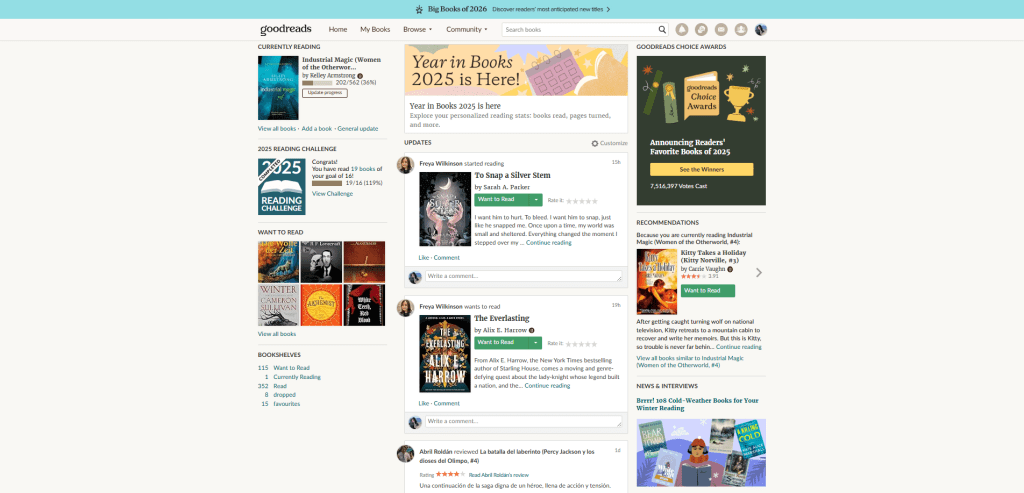
As a short girly (5’2″ /156cm), I can confidently say that bigger is not always better, and that is also the case with Goodreads. It might have a large user base, but it’s lacking in features and updates. One of my biggest bugbears with this site (and the app) is the lack of a dark mode. I already work a desk job and wear glasses, my eyes are TIRED 24/7, so I don’t particularly enjoy logging into the bright white glare of Goodreads.
Picture the scene for a minute:
I’m lying in bed, it’s dark, my man is asleep, and I’m reading on the dark mode Kindle app to try and calm my anxiety enough to finally sleep. My heart rate is slowing, I’ve read a good 30 pages… but then I need to open Goodreads to mark my progress and it opens with the white hot, eye-scalding glare of a 90’s camera flash. Amazon, please explain that user journey process to me.
It’s not just me begging for something as simple as dark mode: see the Goodreads’ forum and then see the 2021 post on Goodreads’ most popular ideas, spoilers: dark mode has the most likes. Instead, the kinds of updates we get on Goodreads are… a new logo! Super useful! And don’t forget 2025’s update to include the ‘Want to Read’ list in ‘Your Books’ on Amazon!
This is what Goodreads users received in 2025, and it’s difficult not to feel skeptical of Goodreads’ claim that this feature is one of the most popular customer requests when it’s also the one most likely to bring revenue into Amazon, unlike dark mode. You can see the full list of Goodreads’ announcements here, which shows that 2025 was certainly more productive than 2024, but it isn’t very inspiring.
Enough complaining—I’ve used Goodreads for years, and it does have its perks.
Goodreads’ Best Features
Annual Reading Challenge: The annual reading challenges are great. Viewable in ‘Year in Books’ from the My Books section, and users can look through their previous years for some sweet reading memories.
Reading Stats: I love the reading stats, but I hate how hard this page is to find. Go to ‘My Books’, then ‘Your reading activity’, then ‘Reading stats’. (Side note: the mix of capitalisation in these links also drives me insane.) What you get is stats on the number of pages and books read each year with a break down on ratings if you click ‘details’.
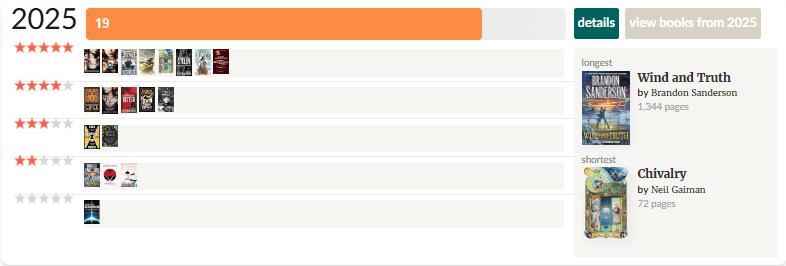
You can also see graphs detailing your favourite publication years along the Y axis, and what year you read those books along the X axis.
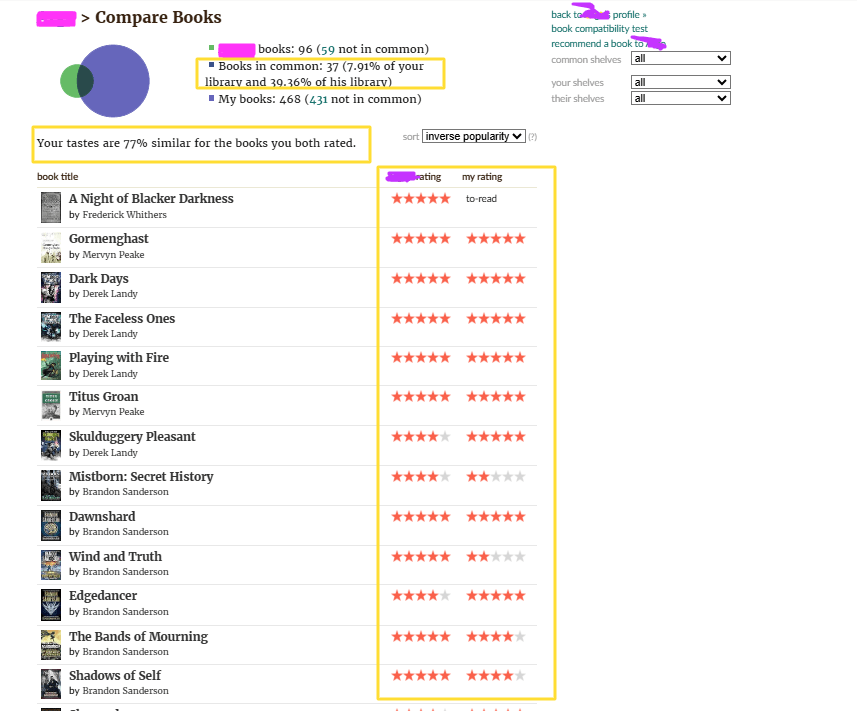
Compare Books: My next favourite feature is the ability to compare your books with friends. Here, I discovered that my reading tastes are 66% similar to my cousin’s, and I can also compare our various ratings for each book. Finding a reader who has a high similarity means that reader will probably choose books close to your own desires, so when they rate a book five stars, it’s likely to be a good pick!
Author Coverage: Plenty of authors are present and posting on Goodreads. It’s the place to be if you don’t already follow your favourite authors on Bsky, FaceBook, or WordPress.
Large User Base: As a book reviewer with a blog, the huge number of eyes on this site means I am unlikely to completely ditch Goodreads. Most of my viewers come from the WordPress reader, but a small percentage make it here from my links on my Goodreads.
P.S. You can subscribe to my blog to send my posts straight to your inbox.
The StoryGraph – The Best Choice
Users: 4 million
With at least 3.8 million active users in 2025 (The Guardian, 2025), The StoryGraph is a beautiful, modern book tracker with its readers at the heart of each update. I’ve been using the app and website for less than a fortnight, and it’s already so easy for me to say that this is hands-down the best choice.
The easy-on-the-eyes colour scheme, the readily available statistics, the smooth instructions for moving your Goodreads data onto The StoryGraph—something I’d dreaded—which took me less than five minutes.
Now, I haven’t used the site or app for long, but one feature I’m looking for (that Goodreads did not offer until Feb 2026, months after I first published this blog) is the ability to mark my DNFs (Did Not Finish) and be sure that those unread pages and unfinished books don’t contribute to my annual challenges. StoryGraph offers that, sort of. There’s a whole StoryGraph thread about how DNF pages don’t count towards the page goal, but following my Goodreads’ data import, StoryGraph conjured an extra two thousand pages onto my yearly total.
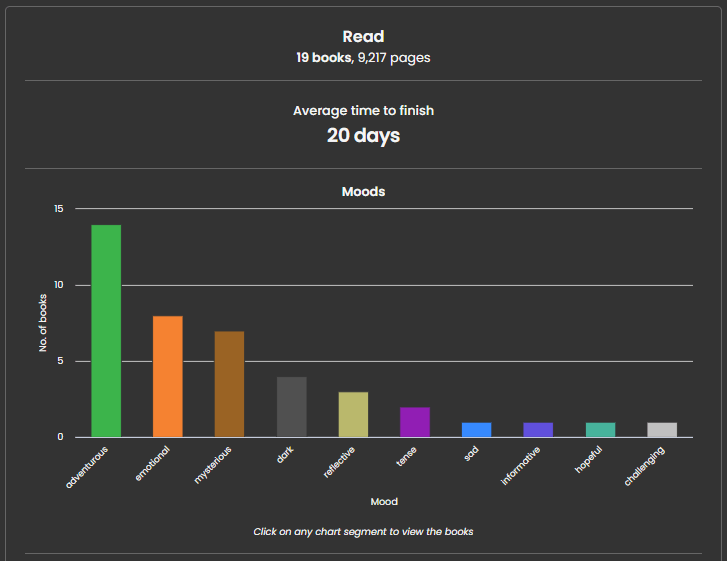
And then, a couple of hours after publishing this blog, I discovered the root of the issue in my Reading Journal section of StoryGraph. By marking certain reads as DNFs, I’d accidentally recorded a second entry for my DNFs instead of altering the first. Fixed now!
StoryGraph isn’t the prettiest book tracker on this list, but it offers a lot of data, a great experience, and a solid user base with great recommendations.

The StoryGraphs’ Best Features
Annual Reading Challenge:
DNF Tag: On Goodreads, I got around the lack of this tag by making a shelf titled ‘dropped’. It was easy enough to move my dropped shelf onto the DNF tag in StoryGraph. As a side note, there’s also an option to ‘pause’ books that you’re not reading, but aren’t ready to say you’ve DNF’d.
Stats: Easy to find and much more delicious than Goodreads’. Offering insight on the moods of books read, the average time to finish a book, formats (digital, paperback, hardcover, audio), most read authors, and more. It even has a customisable date range! I love it!
Transparent Roadmap: The StoryGraph gives its readers every reason to stay engaged with the platform; the publicly available roadmap shows what the team are currently working on or aspiring towards. It’s the polar opposite of Goodreads.
Sophisticated Star Ratings: Rate more meaningfully with quartered ratings, enabling ratings of 4.25, 4.5, and 4.75, etc.
Paid Subscription: I asked a paid subscriber to tell me about how they use this feature: “It is nice to add custom stats, but if you have a lot of books it can be really tedious to do the ones that require you to make a tag, since you’re putting tags on maybe hundreds of books.”
Tome Books – The Aesthetic Choice
Users: ????
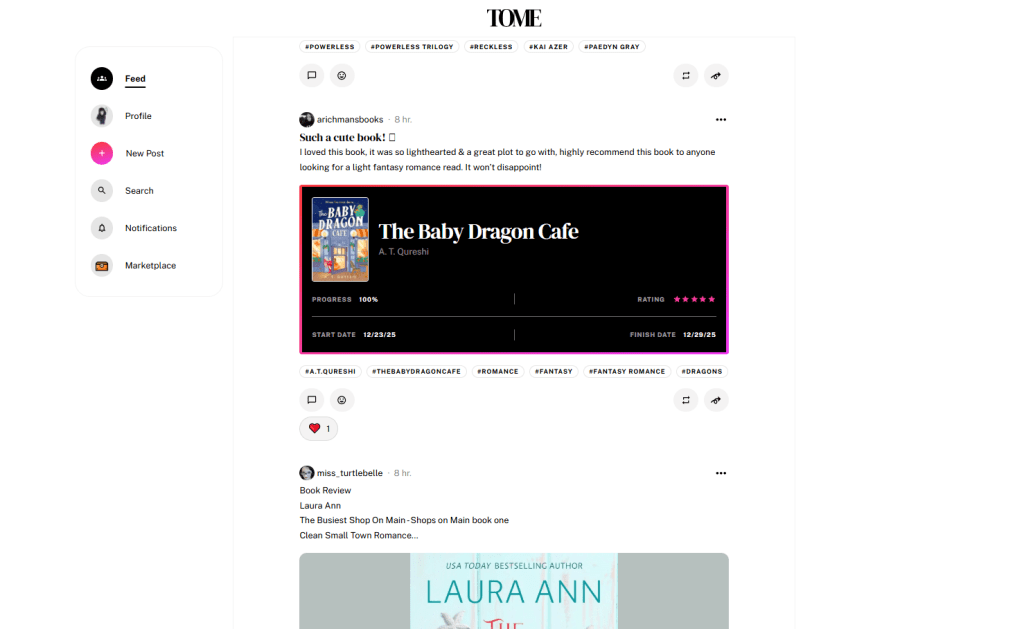
This is the newest book tracker on this list, having launched the app on January 28th, 2025. It’s like Twitter, WordPress, and Booktok rolled into one. Tome is best for users who are looking to create lists and reviews with aesthetic. It’s all about community and personalisation, and people are creating some truly beautiful profiles!
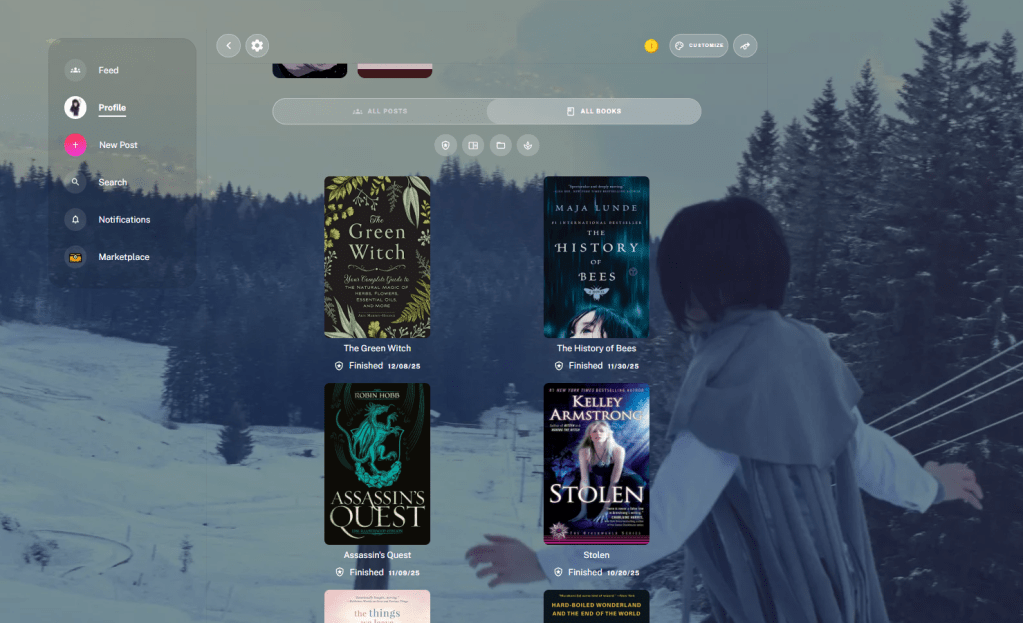
Pictured above is my profile with one of my Mistborn Vin cosplay photos.
As excited as I was when Tome first launched, the desktop app’s settings are very lacking, which I discovered on trying to figure out what’s going wrong with my mobile account login.
As of February 2026, Tome introduced dark mode! This is a young app, and it’s clearly still growing. It could be a real competitor in a few years time, but I don’t think it’s there for my purposes yet.
Tomes’ Best Features
Profile Personalisation: The options here are divine. It’s the main selling point of the platform.
All Books Aesthetic: The All Books section which lists the books read is focused on beauty, and it delivers. It’s not the most functional if you’re looking to skim through a list, but it looks great.
Community: I’m not hugely involved in the Tome community, but anyone strong enough to make it into a circle will find that it’s an extremely active platform. If you’ve ever wished for a Twitter/ Bluesky dedicated to books, Tome is the place to be.
Spreadsheets – The D.I.Y. Choice
Users: N/A
In my opinion, this is the only way to be truly confident on pages read, but it’s hella ugly, boring, and lonely to tap into your spreadsheet of choice (Excel, Google Sheets, Libre Office Calc, etc.) instead of a dedicated app.
Technically, you have the freedom to do whatever you want, but it also requires a time investment and a good dose of creativity. For example, I wouldn’t have guessed how much I wanted a moods graph until I tried The StoryGraph, which conjured one from my Goodreads data immediately. Delightful. To make that on a spreadsheet would have firstly required the ingenuity to know I wanted that, and secondly the patience to figure out the required calculations.
That said, if you have pounds to spare, you could also just buy a template online and skip the effort of figuring out some of the most basic calculations or how to make it look a little pretty. I had a quick search online and found this particularly comprehensive option in beautiful pastel colours by MyProductiveLifeCo:

*This post is not sponsored in any way. Other templates are out there!
It’s been a few years since I made a serious go at documenting my libraries on a spreadsheet, and it’s certainly not my weapon of choice, but if you’re already down with the sheets, a master of functions, or whatever title you don as an expert spreadsheet user, this might be the tool for you!
Spreadsheets’ Best Features
Private: Keep your lists at private or public as you desire. Keep it entirely to yourself, send it to close friends, or share the link on Bluesky—the choice is yours.
Total Control: Use new sheets to create independent lists and shelves. Choose your own rating system (5 stars, or score out of 100?). Complete control over colours and fonts. Own your lists completely.
Fable – The Beautiful Choice
Users: 3 million
I’ve dabbled with Fable, but I’m not a dedicated user of it, unlike my experiences with the previous entries on this list.
Fable is a social book tracker, managing your reviews and encouraging joining digital reading clubs and sharing curious lists for niche desires, such as the ‘Whimsigoth Winter’ list which opens the Explore tab on my experience. Fable launched in 2021, and is currently owned by Scribd, sporting over one million users and more than 100,000 book clubs (Publishers Weekly, 2025).
Fable handles your Goodreads import more expertly than the other apps on this list. Although it was easy to export my Goodreads data onto a spreadsheet and input that onto StoryGraph and Bookmory, Fable simply asks you to login to your Goodreads and it handles the rest.
I do have a couple questions about how much of my Goodreads’ account access I’ve given to Fable to manage that… I’ve changed my Goodreads password since.
Like StoryGraph, Fable also has a Plus subscription mode which enables users to access more exclusive features, but unlike StoryGraph, Fable hides most of its charts and stats behind a paywall. Additionally, its monthly subscription is the most expensive on list, there’s no dark mode, and the email spam I get from the free plan is already frustrating.
Fable’s Best Features
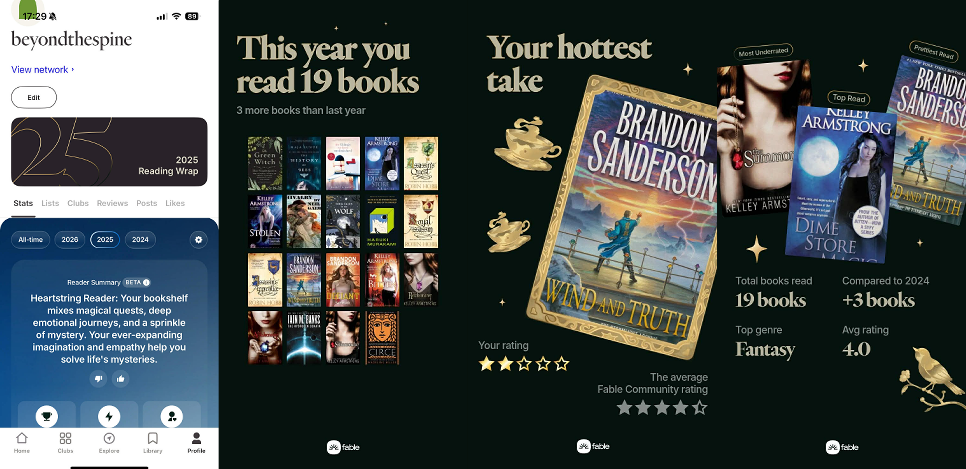
Fable Wrapped: The Fable Reading Wrap is undoubtedly the prettiest, most sharable annual collection from any book tracker app on this list.
Cozy UI: (Aside from lacking a dark mode) Fable has one of the best UI’s for a mobile app tracker. It’s intuitive and easy on the eyes.
Bookmory – The Achiever’s Choice
Users: ????
I haven’t used this one for very long, so a more experienced user might have more to say here.
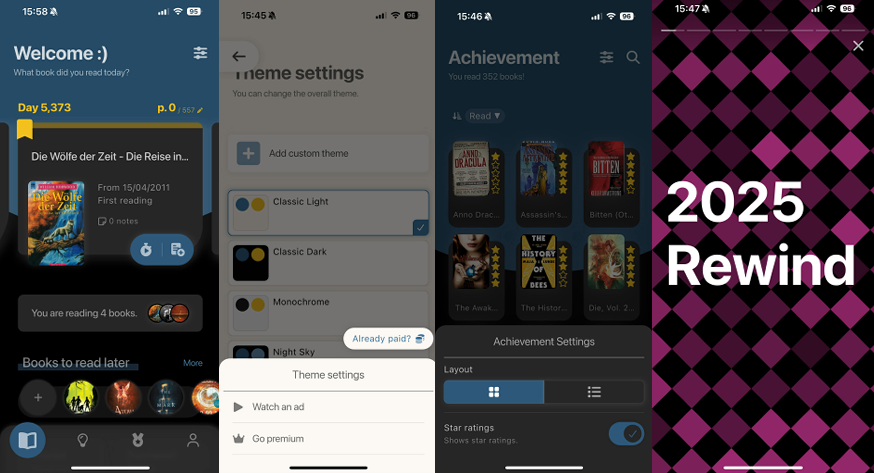
Bookmory is the Duolingo of book trackers. It’s focused on ‘achievements’ and ‘streaks’. If you’re an avid reader who finishes what they start, this could be the app for you!
The Goodreads import was easy, but mucked up the dates. The Year in Review videos are well designed, but I couldn’t really enjoy them because my books were jumbled across multiple (wrong) years. Of course, this wouldn’t be an issue for someone beginning their book tracking journey with Bookmory.
I was very glad to find the themes setting in the options, quickly switching to dark mode ASAP. What wis less cool, is that the theme is locked behind an advert, and reset the first time I opened the app—though that could be a rare bug, it didn’t happen a second time.
On average, I read 16 books per year, around 7000 pages, and often have some books in the background that I work on very slowly, like short story collections. Unfortunately, Bookmory’s achievement-focused interface leaves me feeling a bit guilty on the homepage. It immediately tells me that I’ve been reading Die Woelfe der Zeit for 5,373 days, and I still haven’t finished it. This book was supposed to be a challenge for me to learn more German, and I feel pretty ashamed seeing that (incorrect) day count stamped over it. Of course, I can move it to the ‘paused’ section, where I can hide my shame, but my feelings were already hurt.
Bookmory’s Best Features
Book Calendar: See a cute display of what you were reading and when, laid out in a calendar format with the covers of each book.
Annual Rewind: A funky, modern presentation of a yearlong reading journey. Reminiscent of the Spotify wrapped.
Timer: Record every second spent with your books using the timer.
Hardcover – The Up and Coming
Users: 8000+
Hardcover has very few downloads on the iOS app store, and the last userbase count I could find was 8000~ (Hardcover blog, 2024). It’s a fairly new service, debuting in 2021, so it’s still growing.
It’s a social book tracker, encouraging reviews, prompts, and lists to engage with the community.
Like The StoryGraph, Hardcover is very forthcoming with its updates on its blog (see example here). It’s always great to know that a dedicated, passionate team is behind the scenes to support the best experiences for their communities.
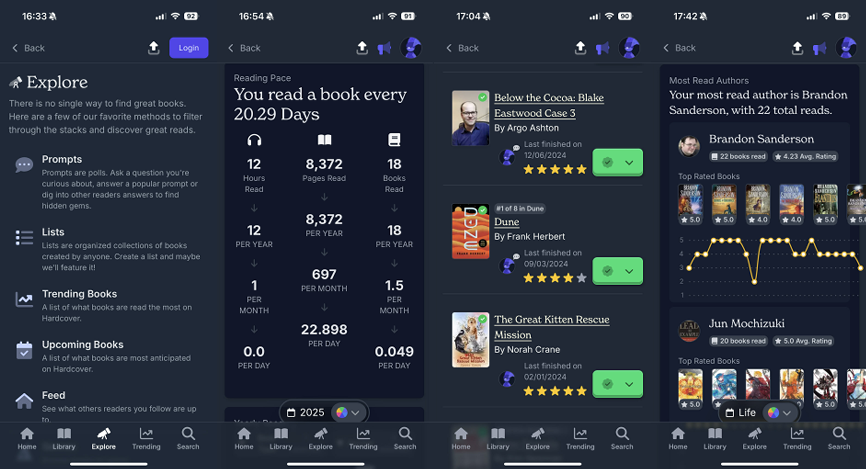
Hardcover is probably the biggest competitor for The StoryGraph on this list, offering a large selection of free statistics and graphs set in a more attractive user interface. On the flipside, it’s slower than StoryGraph, doesn’t have a ‘pause’ feature, and I couldn’t find an option to record the pages read on a DNF. I want the world to know that I made it through 600 pages of Wind and Truth, damn it!
Additionally, Hardcover would benefit from a pass from a dedicated proofreader. There’s no major mistakes, but I spotted an errant comma, and some incongruous capitalisation choices here and there.
Hardcover’s Best Features
Fast Library Import: This was one of the fastest library imports from Goodreads that I experienced!
Half Star Ratings: Not an exclusive feature, but certainly not supported by Goodreads.
Indie Book Cover Discovery: It didn’t always succeed, but it managed to find covers for some of the niche indie titles I’ve reviewed, such as Norah Crane’s amazing The Great Kitten Rescue Mission. Ashton’s Blake Eastwood series didn’t fare quite so well!
Final Thoughts
Will you start tracking your reading journey? Will you make the switch from Goodreads? Is there an app missing from this list that you’d like to see me cover? Let me know in the comments below, or send me a message on Bluesky.
Or subscribe to the blog for book reviews and reading-adjacent posts straight to your inbox.


 Beyond The Spine Reviews
1 Comment